Budget
The basic structure of the budget is:
· personnel costs (wage costs of implementors, including all levies),
· other costs
- remuneration for the mentor (including all contributions, a total of CZK 50,000 for the entire period of project implementation, the remuneration will be paid in the last month of the mentor’s work on the project);
- travel costs;
- training costs;
- operating costs (material e.g. office or laboratory, minor tangible assets, professional literature);
- costs of services and minor intangible assets;
- overhead costs of the department (15% of other project costs).
The total number of financial resources for the project is multiples of the unit cost of work capacity corresponding to a working capacity 0.1 of normal working hours of a full-time position per month.
The value of this unit is 7,986 CZK:
- 4,700 CZK is intended for personnel costs (including all compulsory expenses),
- 3,286 CZK is earmarked for other costs,
- 492,90 CZK is for overhead costs.
Figure 56: Budget – items that need to be further itemized by the main implementor
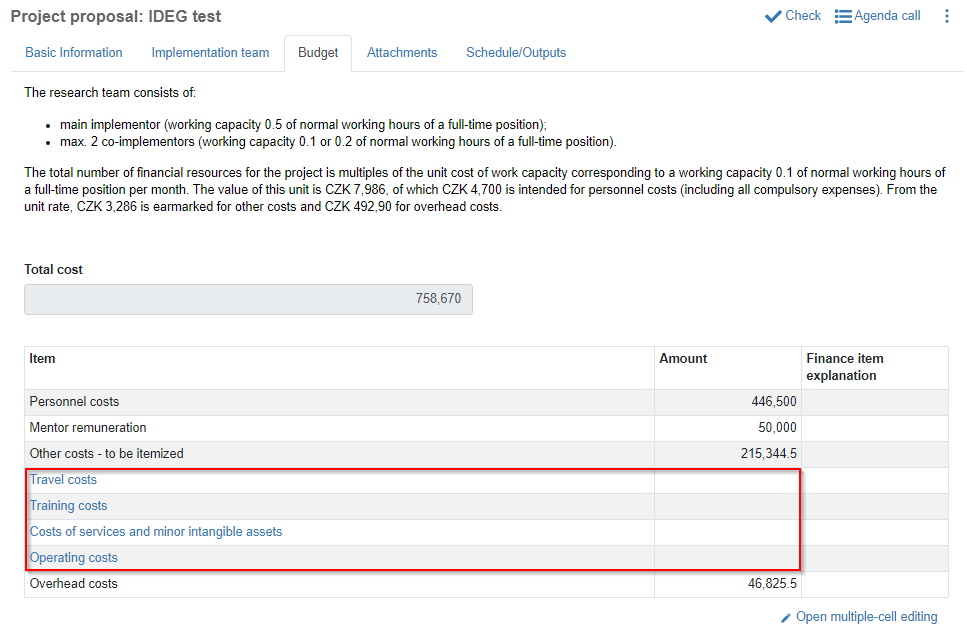
Personnel costs: it is automatically prefilled by the system based on the total working capacity of the implementation team (main/individual implementor has always working capacity 0.5, co-implementors either 0.1 or 0.2) therefore you need to complete adding your team members before you are going to enter the budget items.
Mentor remuneration: it is set to 50,000 CZK.
Other costs - to be itemized: this item displays the total amount of other costs that you need to itemize among four remaining items below. Once you are done with this, the “Other costs - to be itemized” item must display 0 in the “Amount” column so that the system will let you proceed with the proposal submission.
· Travel costs
· Training costs
· Costs of services and minor intangible assets
· Operating costs
Overhead costs: it is automatically calculated by the system so that it amounts to 15% of other project costs.
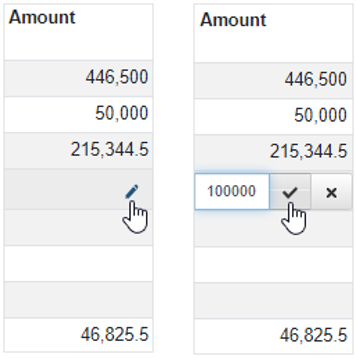
To add amount in the specific budget item, hover with your mouse over the appropriate row until you see  icon. Click it, type in the amount and confirm it by clicking check mark
 icon.
Figure 57: Budget – editing budget items
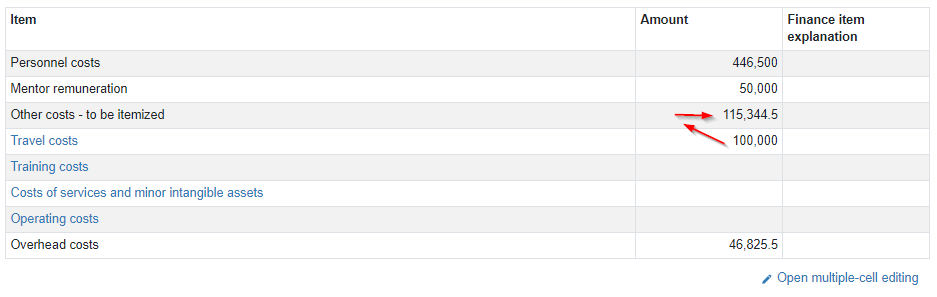
Once you confirm it, this amount will be automatically subtracted from the item the “Other costs – to be itemized”. Proceed the same way with the other budget items. You can also add justification for each amount in the “Finance item explanation” column.
Figure 58: Budget – adding amount for „other costs“ items