
Basic information
Completion requirements
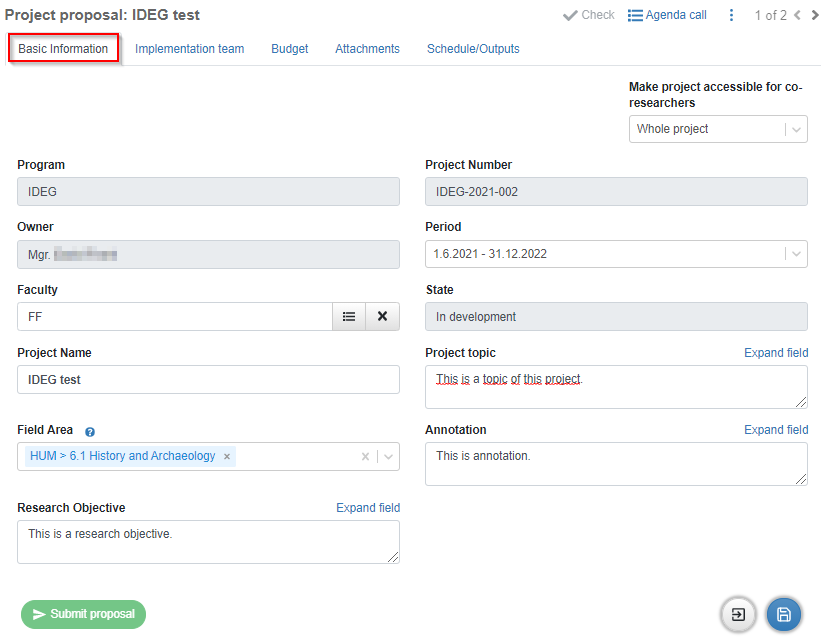
On this tab, you need to fill out the following fields (you can adjust the project name as well if needed):
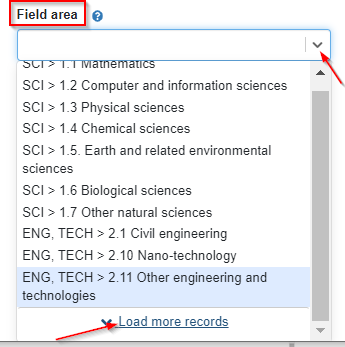
· Field Area: to assign an appropriate Field area, you need to click an arrow in the dropdown and click the record you would like to pick. If you are not able to locate your area, just click “Load more records” link and use a scroll bar on the right to go through the full list.
· Research objective
· Project topic
· Annotation
Figure 16: Basic Information – picking Field area
Once you have all fields completed, make sure to click  save icon in the bottom right corner of the page.
Figure 17: Creating a new project – completed „Basic Information“ tab
Last modified: Thursday, 7 January 2021, 3:06 PM