
Schedule
To add your project schedule items, pick “Schedule” from the “Type Definition” dropdown. To complete a form for this given schedule phase, you need to fill out following fields:
· Name - type in a specific title for a given schedule phase.
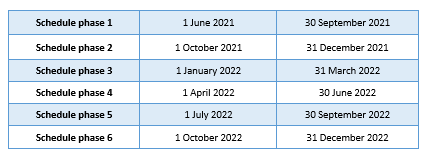
· Start date/End date – click the box for each date and select start date and end date from the calendar. Please add six schedule phases using the dates from the table below. You can also locate these phases in the "IDEG - schedule phases" document that is accessible via IS ZČU II document section. This schedule covers the whole implementation period of IDEG programme, i.e. 1 June 2021 – 31 December 2022.
· Note – provide details for each of the six phases. Be specific when describing activities that are being carried out in each phase and how they are tied to the research objectives and educational goals.
Figure 64: Schedule/Outputs – adding schedule phases
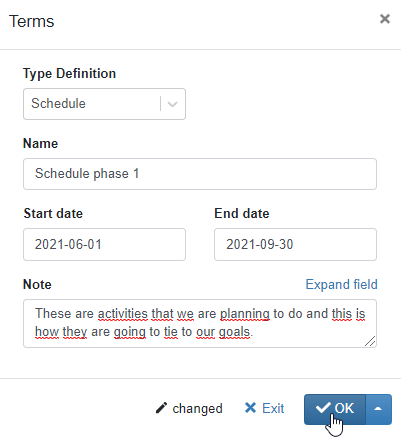
To save the record, click OK button in the “Terms” form and then save  icon in the bottom right corner of the page.
Figure 65: Schedule/Outputs tab – added schedule phase
